 Paraguay
Does PayPal Work in Paraguay? What You Can (and Can’t) Do
Short answer: Paraguayan PayPal accounts can send payments, link cards, and shop online with buyer protection, but they generally cannot receive funds or withdraw a balance to a local bank. Xoom and the 2026 rollout of PYUSD change part of that picture, though not the core problem.
Here’s what that means right now:
- You can: open a PayPal account, link a debit or credit card, pay merchants abroad, and hold PYUSD inside the app.
- You can’t: receive a payment from a client or buyer and pull it into a Paraguayan bank account directly.
- Do this next: verify your account fully before you need it, and test any incoming-payment workaround with a small amount first.
Key Takeaways
PayPal in Paraguay works one way, for spending and linking cards, but not the other way, for receiving and withdrawing to local banks.
| Point | Details |
|---|---|
| Core limitation | Paraguayan PayPal accounts can pay and shop but generally can’t receive or withdraw to local banks. |
| Xoom is the workaround | Xoom supports cash pickup or bank deposit in Paraguay, bypassing PayPal’s withdrawal restriction. |
| PYUSD helps only partly | You can hold and move PayPal’s digital dollar, but converting it to a local bank deposit is still unsolved. |
| Alternatives worth comparing | Wise, bank wires, and remittance services each solve the receiving problem differently. |
| Verify before you rely on it | Test any transfer method with a small amount before using it for real income. |
This article is general information, not a substitute for advice from a qualified financial advisor. Consult a qualified financial professional about your own circumstances before acting on anything here.
Table of Contents
- Is PayPal Available in Paraguay? Current Status and Limitations
- How Do You Send or Receive Money With PayPal in Paraguay?
- What Are the Best PayPal Alternatives for Receiving Payments in Paraguay?
- What Does PayPal’s PYUSD Rollout in Paraguay Actually Change?
- How Do You Set Up and Verify a PayPal Account in Paraguay?
- What Fraud Risks and Regulatory Warnings Should You Watch For?
- Managing International Payments as a Traveler in Paraguay
- Sources
Is PayPal Available in Paraguay? Current Status and Limitations
PayPal’s own Paraguay country page confirms the app works for sending payments, storing cards, and shopping with buyer protection. That’s the functional half of the service. The half that trips people up is receiving money.
Wise’s breakdown of PayPal in Paraguay confirms residents can open accounts and link cards, but under normal conditions PayPal does not let them receive payments or hold a spendable balance locally. Local reporting from El Nacional points to the same wall: withdrawals into Paraguayan banks are routinely blocked, which pushes people toward foreign accounts or third parties just to cash out.
The gap in plain terms:
- A freelancer invoicing a US client through PayPal can get paid into the account but can’t move that money to Banco Itaú or Banco Continental.
- An e-commerce seller listing on a marketplace that settles via PayPal faces the same dead end at withdrawal.
- Buyers are fine. Sellers and freelancers are the ones who hit the wall.
PayPal’s developer documentation on supported payout features does list Paraguay, which tells you the infrastructure exists somewhere in PayPal’s system. It just isn’t switched on for ordinary retail withdrawals tied to the country’s Sipap banking rails.
How Do You Send or Receive Money With PayPal in Paraguay?
The workaround most people land on isn’t PayPal itself. It’s Xoom, the PayPal-owned remittance service built specifically for cross-border delivery.
Xoom lists Paraguay as a supported delivery market, and unlike a standard PayPal balance, Xoom transfers can land as cash pickup or bank deposit depending on what’s available on the receiving end. This is the practical route when someone abroad wants to pay you and a straight PayPal transfer won’t clear into your bank.
A simple test flow looks like this:
- The sender logs into PayPal or Xoom and picks Paraguay as the destination.
- They choose a delivery method: cash pickup at a partner location or bank deposit where supported.
- You confirm the transfer details and identification requirements on your end before the money is sent.
- Once it’s marked as completed, you collect it through the chosen channel rather than waiting on a PayPal balance transfer.
Run a small transfer first, something in the $20 to $50 range, before anyone routes a real invoice payment this way. It’s the cheapest way to confirm the delivery method actually works for your specific city or bank.
PayPal’s own page on sending money internationally notes it reaches over 110 countries, with Xoom offering the added delivery flexibility PayPal’s core wallet doesn’t.
Pro Tip: Ask the sender to screenshot the Xoom tracking number before they submit the transfer. If a pickup location asks for proof and your phone service drops, that number is your fastest way to confirm the transfer is real.
Card-based workarounds exist too. Some people link a Payoneer or similar prepaid card to receive funds indirectly, but expect currency conversion fees and slower settlement than a direct bank deposit.
What Are the Best PayPal Alternatives for Receiving Payments in Paraguay?
If PayPal’s withdrawal wall is a dealbreaker, a few categories of alternatives actually solve the problem instead of working around it.
- Wise handles receiving, currency conversion, and transfers with more transparency on fees and timing than PayPal offers for this corridor. It’s built for exactly the freelancer-gets-paid-from-abroad situation that trips up PayPal users here.
- Bank-to-bank wire transfers work when the sender’s bank supports international SWIFT transfers directly to a Paraguayan account. Slower, but reliable, and no intermediary app involved.
- Remittance services built for cash pickup or mobile wallet delivery cover people without a bank account tied into international rails.
- Stablecoin or crypto rails, including PYUSD, are worth considering only if both sides understand the regulatory gray zone and the conversion step needed to turn digital dollars into usable local currency.
None of these is automatically the right pick for every situation. A freelancer billing monthly wants predictable fees and speed; someone getting a one-time gift from family abroad might just want the cheapest cash pickup option available.
What Does PayPal’s PYUSD Rollout in Paraguay Actually Change?
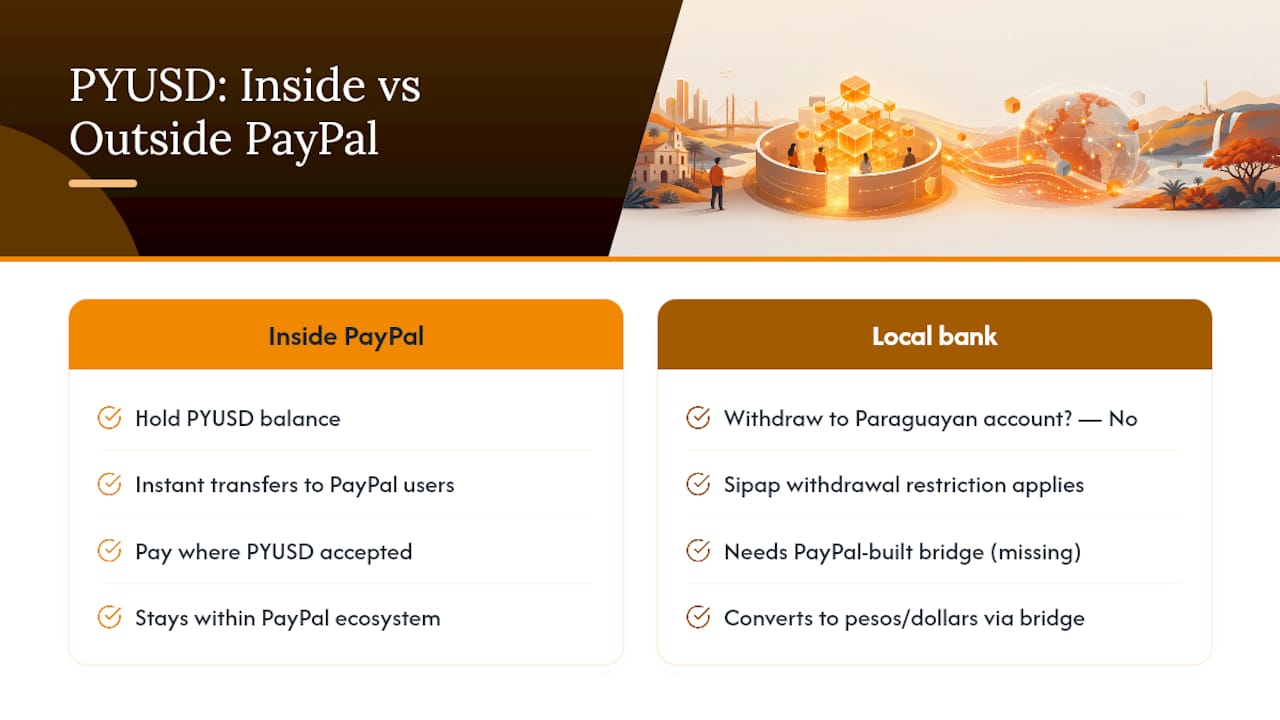
Local coverage from RDN reported that PayPal added Paraguay to the list of markets where PYUSD, its digital dollar, is available in 2026. That lets Paraguayan users hold and move PYUSD within PayPal’s own ecosystem.
Here’s the misunderstanding worth clearing up: holding PYUSD is not the same as withdrawing dollars to a Paraguayan bank account. The Sipap withdrawal restriction that blocks a regular balance transfer still applies. PYUSD sits inside PayPal, and moving it into pesos or dollars in a local account still depends on a bridge PayPal hasn’t built for this market.
Where PYUSD genuinely helps: sending value instantly between two PayPal users, or paying for purchases on platforms that accept PYUSD directly. For everyday cash-out needs, it doesn’t remove the core problem.
How Do You Set Up and Verify a PayPal Account in Paraguay?
Getting set up correctly the first time avoids most of the frustration people report later.
- Sign up with a valid email and phone number, then add your legal name exactly as it appears on your ID.
- Upload identification when PayPal requests it. A national ID or passport typically covers this step.
- Link a debit or credit card and confirm it through the small verification charge PayPal applies.
- Check whether Xoom appears as an option inside your PayPal app. If it doesn’t show up, access it directly through Xoom’s own site instead.
- Test everything with a transaction under $20 before relying on the account for anything that matters.
If verification stalls, double check that your name and address match your ID documents exactly. Mismatches are the most common cause of a stuck review.
What Fraud Risks and Regulatory Warnings Should You Watch For?
Anyone advertising a guaranteed way to withdraw PayPal balances directly into a Paraguayan bank without naming the actual rail involved deserves suspicion. If they can’t explain which bank or service processes the deposit, don’t send anything through them first.
- Verify any middleman offering to “cash out” your PayPal balance before sending funds through them.
- Keep every transaction confirmation, screenshot, and tracking number for at least a year.
- Never share your PayPal login credentials with a third party claiming to help with withdrawals.
- Watch for buyers who overpay and ask for a refund of the difference. This is a classic reversal scam.
PayPal’s buyer protection features cover purchases well, but they won’t help you recover money lost to a fake withdrawal service.
Pro Tip: Screenshot every step of a transaction the moment it happens, not after a dispute starts. PayPal and Xoom support teams move faster when you already have dated proof in hand.
Managing International Payments as a Traveler in Paraguay
If you’re visiting and need to pay a driver, guide, or local service, stick to providers who list multiple accepted payment methods upfront rather than assuming PayPal alone will cover you. Paraguaytransport accepts cash, crypto, Venmo, PayPal, and bank transfer for airport transfers and driver bookings, so payment friction doesn’t become part of your travel logistics. You can get a fixed quote fast through WhatsApp before you land.
— David
Sources
- Envíe pagos, compre, administre pagos y más | PayPal PY
- Recibir dinero con PayPal en Paraguay: ¿Es posible? – Wise
- Xoom, a PayPal Service | Send Money Online
- PayPal suma a Paraguay a su dólar digital
Recommended
- Avoid Hidden Fees in Airport Transfer: Paraguay Guide – Paraguay Transport
- Airport Transfer Alternatives in Paraguay: A Traveler’s Guide – Paraguay Transport
- Private Driver & Airport Transfers Paraguay | Asunción Taxi — ParaguayTransport
- What Is a Private Tour? A Guide for U.S. Travelers in Paraguay – Paraguay Transport
Need a ride in Paraguay?
Fixed-price transfers, airport pickups and day trips — quoted upfront on WhatsApp.